How to Write AI Prompts for Beginners and Create Real Opportunities
When I first started using AI, I did not know how to write AI prompts. In fact, I did not even know that there was something called a “prompt.” I simply opened an AI tool, typed whatever question came into my mind, and expected it to understand what I wanted. I would ask something vague, receive an answer that went in a completely different direction, and then wonder why AI was not giving me what I needed.
For a while, I thought the problem might be the AI. Then I started realizing that part of the problem was how I was communicating with it. As a therapist in my professional work, I have spent many years paying attention to communication between people. What we say matters, but so do context, intention, timing, clarification, and the ability to listen and respond. AI is obviously not another human being, but as it becomes part of everyday life, we are learning how to communicate with something most of us have never communicated with before. That is why I decided that learning how to write prompts should be one of the basic skills I explore on CreatePath AI.
If you are new to AI, this guide will teach you how to write AI prompts that actually work, using a simple formula you can reuse every day. Then we’ll go one step further: how to use those AI prompts to create real opportunities, from freelance work to career growth to new business ideas.
What Is an AI Prompt?
An AI prompt is simply the question, instruction, or information you give to an AI tool such as ChatGPT, Claude, or Gemini.
It can be as simple as: What is artificial intelligence?
Or it can contain much more information: I am completely new to artificial intelligence. Explain what AI is using everyday examples and simple language. Avoid technical terms and keep the explanation under 300 words.
Both are prompts, but they are likely to produce very different answers. I like to think of AI prompts as the beginning of a conversation. You are giving AI information about what you need, why you need it, and what kind of response would be useful to you. The clearer that communication becomes, the more useful the response can often become.
Why Most Beginner AI Prompts Fail
When I look back at the way I first used AI, my prompts were usually very short and very vague. Beginner AI prompts usually fail for three reasons:
- Too vague. “Help me with marketing” could mean a hundred things.
- No context. The AI doesn’t know who you are, who the audience is, or what you want to achieve.
- No format. You didn’t say whether you want a list, an email, a table, or a short paragraph.
Fixing these three problems improves your results immediately.
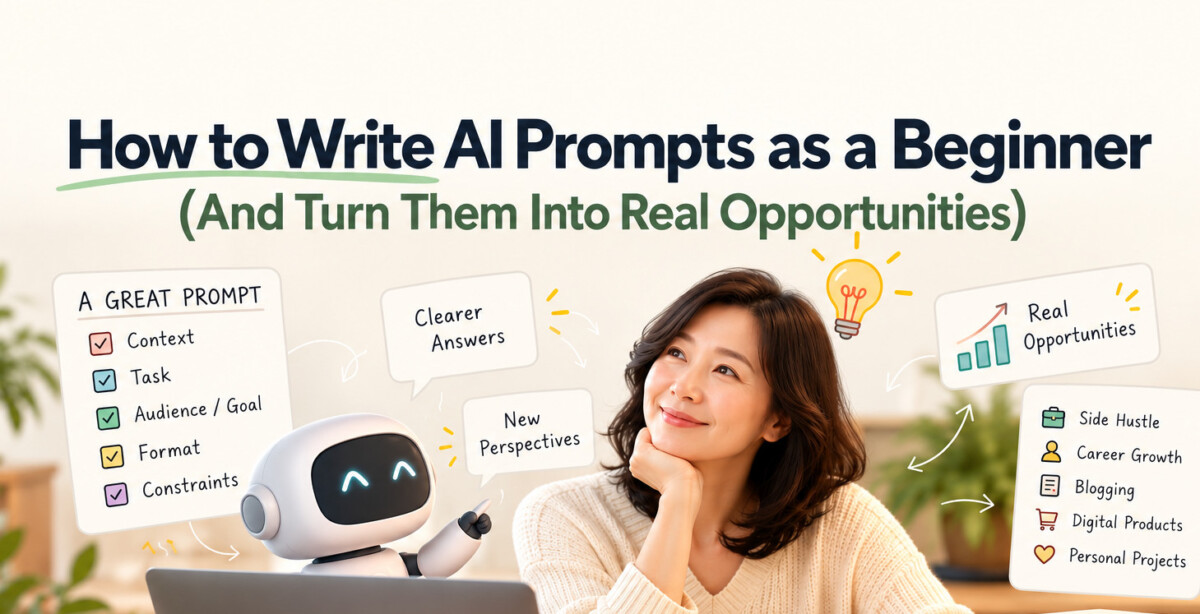
The 5-Part Prompt Formula I Use as a Beginner
There are many AI prompts frameworks, but I wanted something simple enough to remember. The formula I find most useful is: Context + Task + Goal + Format + Constraints
| Part | Question to ask yourself | Example |
|---|---|---|
| Context | Who am I and what’s my situation? | “I’m a beginner blogger with 20 subscribers.” |
| Task | What exactly do you actually want AI to do? | “Suggest 10 blog post ideas.” |
| Goal | Who is it for and what’s the purpose? Why are you doing this? | “For people new to AI who want side income.” |
| Format | How should the answer look like? | “A numbered list with a one-line description each.” |
| Constraints | What should AI include or avoid? | “No technical jargon. Keep each idea practical.” |
Copy-and-paste template
I am [who you are / your situation].
I want you to [task].
This is for [audience] and the goal is [purpose].
Please give it as [format, length, tone].
Avoid [things to avoid] and include [must-haves].
The goal is not to make AI prompts longer but to give AI the information it needs.
Before and After: See the Difference
Weak prompt:
Write a social media post about AI.
Strong prompt:
I run a small bakery and I’m new to AI. Write three Instagram captions announcing our new sourdough line. The audience is local customers aged 25 to 45. Keep each caption under 40 words, friendly in tone, with one emoji and a call to action to visit this weekend.
6 Prompting Habits That Make You Better, Fast
- Share your goal, not just your task. “Help me prepare for a bank interview” beats “give me interview questions.”
- Give examples. Paste a sample of the style you like and say “write something similar.”
- Paste the real material. If you want feedback on your writing, include the text.
- Ask the AI to ask you questions. Try: “Before you answer, ask me any questions you need to give the best result.”
- Iterate. Your first prompt doesn’t have to be perfect. Follow up with “make it shorter,” “more casual,” or “give me three versions.”
- Save your best prompts. Keep a document of prompts that worked so you can reuse and improve them.
How to Use AI Prompts to Create Opportunities
Here is the part most beginner guides skip. Knowing how to write AI prompts is useful. Knowing how to apply them to create opportunities is where the real value is. Below are seven practical paths, each with a starter prompt.
1. Build a content or blogging presence
AI can help you plan, outline, and edit content faster, so you publish consistently. Consistency is what builds an audience.
“I’m starting a blog about [topic] for [audience]. Create a 30-day content calendar with one post idea per day, grouped by theme, and suggest a search keyword for each.”
2. Offer freelance services
Many small businesses need help with writing, summarizing, research, or organizing information but don’t know how to use AI. You can use AI to deliver faster, then add your own judgment and quality control.
“I want to offer AI-assisted services to small businesses. List 10 specific services I could sell as a beginner, what each would include, and a realistic price range.”
3. Find your niche
General AI skills are common. AI skills applied to a specific field are rare. Combine AI with something you already know, such as teaching, real estate, healthcare administration, or cooking.
“My background is in [your field]. Suggest 10 ways AI could save time or solve problems for people in this field, and rank them by how much someone would pay for the solution.”
4. Grow your career
Use AI as a career coach and practice partner.
“I’m a [job title] who wants to become [target role]. Identify the skills gap, create a 90-day learning plan, and give me 3 portfolio project ideas I can finish in a weekend each.”
5. Create digital products
Templates, checklists, mini-guides, and prompt packs can be built with AI assistance and refined with your own experience.
“I want to create a simple digital product for [audience] who struggle with [problem]. Suggest 5 product ideas, an outline for the best one, and how I’d explain its value in two sentences.”
6. Validate business ideas cheaply
Before spending money, use AI to stress-test an idea.
“Here is my business idea: [description]. Act as a skeptical advisor. List the biggest risks, who the first 10 customers might be, and the cheapest way to test demand in two weeks.”
7. Teach and share what you learn
Documenting your journey is itself an opportunity. People trust practitioners who share real results, mistakes included. Turn what you learn into blog posts, short videos, or newsletters.
“I just spent a week learning to use AI for [task]. Help me turn my notes below into a beginner-friendly blog post with a clear lesson, a personal story, and three takeaways.”
A Realistic Note on Expectations
AI is a powerful assistant, not a magic income machine. Results come from combining three things: good AI prompts, your own expertise, and consistent action. Always review AI output for accuracy before sharing or selling anything, and be transparent with clients about how you use AI where appropriate. Be skeptical of anyone promising guaranteed income.
Frequently Asked Questions
What is the easiest way to write good AI prompts?
Give context, state the task clearly, say who it’s for, choose a format, and add any constraints. The 5-part formula above covers all of this.
Do I need to learn “prompt engineering” to use AI well?
No. As a beginner, clear and specific communication matters far more than technical tricks. Treat the AI like a smart colleague who needs a good brief.
Can beginners really make money with AI prompts?
Some people do, usually by combining AI with a skill or niche they already have, such as freelance services, content creation, or digital products. Results vary, and there are no guarantees.
Which AI tool is best for beginners?
Claude, ChatGPT, and Gemini all work well. Pick one, learn it deeply, and focus on improving your AI prompts rather than switching tools.
How long should a prompt be?
As long as it needs to be. Simple questions can be one line. Complex tasks benefit from several sentences of context.
Final Thought
When I first started using AI, I thought I was simply learning how to use a new tool. I did not expect communication itself to become such an important part of the experience, but the more I use AI, the more I realize that useful results often begin before AI gives us an answer.
They begin with the way we ask. A prompt is not just a command but it is the beginning of a conversation. And learning how to write better AI prompts may really be learning how to communicate more clearly with a new kind of tool. For someone completely new to AI, I think that is one of the most useful places to begin. Pick one prompt from this article, customize it, and run it today.