How to Create a Personalized Daily Planner With AI
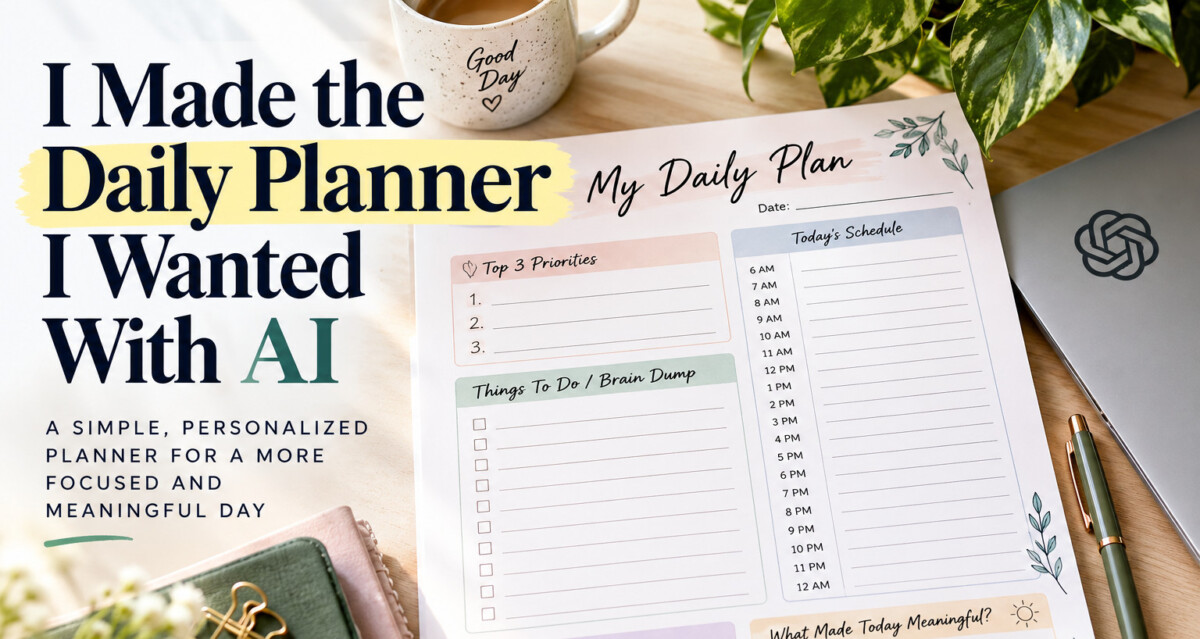
I Made the Daily Planner I Wanted With AI
There are countless daily planners online and in stationery stores. I have looked at many of them, but finding one that fits exactly how I want to organize my day is not always easy. Some have too many sections. Some do not give me enough room to write. Others have beautiful designs but do not match the way my days actually unfold. That made me wonder if I could create a personalized daily planner with AI instead of continuing to search for one that felt right. I wanted a daily planner that helped me organize my responsibilities, but I also wanted it to help me slow down for a moment.
So I decided to create my own. This is not the first time AI has helped me turn an idea into something real. I also used AI to help me build my first WordPress website from scratch. Read How I Built My First AI Website With WordPress and What I Learned
I Started With What I Actually Needed
Before asking AI to design anything, I first thought about how I wanted to use the planner. I wanted something I could print, place in front of me, and understand immediately. My original list was simple:
- Date
- Top 3 Priorities
- Hourly Schedule
- Things To Do (Brain Dump)
- Today’s Words
- What Made Today Meaningful?
That became the foundation of my daily planner. I do not think the best place to start is by simply asking AI: Make me a daily planner. AI can certainly generate one, but you may end up with a generic planner that looks very similar to the ones you could already buy. Instead, tell AI how you actually live.
How I Used AI to Create a Personalized Daily Planner
The first thing I gave AI was context. I wanted it to understand that I needed structure, but not too much structure. A prompt like this is a good starting point:
I want to create a simple one-page daily planner that fits my real life. I often have many tasks and ideas in my head at the same time. I want enough structure to organize my day, but I do not want the planner to feel rigid or overwhelming.
Then I explained what I wanted included:
I want the daily planner to include the date, my top three priorities, an hourly schedule from 6 AM to midnight, a large brain dump area, one kind message to myself, and a short reflection section at the end of the day.
Giving AI that background makes a big difference. You are no longer asking for “a planner.” You are asking for your daily planner.
Step 1: Tell AI About Your Real Day
AI works better when it understands your situation. You can describe things such as:
- what time your day usually starts
- whether your schedule changes often
- whether you prefer hourly planning or flexible blocks
- how many priorities you realistically want to complete
- whether you need more space for appointments or notes
The more clearly you explain what you need, the more useful the suggestions can become.
Step 2: Ask AI to Question You Before Designing It
One thing I have learned from using AI is that the first answer is not always the best answer. Instead of asking AI to immediately create the final planner, ask it to question you first. For example: Before you design my daily planner, ask me five questions that will help you understand how I organize my day, how much writing space I need, what usually interrupts my schedule, and what I want to reflect on at the end of the day. This can help you think about needs you may not have considered yet.
Step 3: Keep the Top Priorities Small
I chose Top 3 Priorities for a reason. A long to-do list can make everything feel equally urgent. Three priorities force me to ask: If I only accomplish a few important things today, which ones matter most? That question helps me focus.
Step 4: Add an Hourly Schedule, But Keep It Flexible
For my daily planner, I wanted the schedule to run from 6 AM to 12 AM.
Step 5: Create a Brain Dump Section
The Things To Do for brain dump section may be one of the most useful parts of the daily planner for me.
Step 6: Add a Kind Word to Yourself
I did not want my planner to be only about accomplishing things. I also wanted one small section called: Today’s Words. This section is for one kind sentence I want to say to myself that day.
Step 7: Add a Small Reflection at the End of the Day
I also wanted one simple reflection section: What Made Today Meaningful? I wanted one small moment at the end of the day to pause and look back. Maybe something meaningful was a task I completed.
Step 8: Turn the Structure Into a Design
Once I knew exactly what belonged on the planner, I could move from planning to design. For a printable version, Canva is an easy option for beginners. I would start with a blank US Letter document, 8.5 x 11 inches. I chose a two-column layout.
Top Section
DAILY PLAN
Date: ____________
Today’s Words
Left Column
Top 3 Priorities and Things To Do
Right Column
Hourly Schedule: 6 AM through 12 AM
Bottom Section
What Made Today Meaningful? Something I want to remember or say to myself. Fonts, spacing, borders, and small design details can change the feeling of the page without making it difficult to use.
Step 9: Export the Planner as a PDF
After the design is complete, the next step is exporting it as a PDF. In Canva, this can generally be done through: Share → Download → PDF Print
A printable PDF makes the planner easy to save and print whenever needed. You could also create your planner in Microsoft Word, Google Docs, or another design program. The tool is not the most important part. The important part is that the planner reflects how you want to organize your day.
The Prompt I Would Use to Start
If you want to create your own version, this is the prompt I would start with:
I want to create a personalized one-page daily planner that fits the way I actually live. My schedule can change during the day, and I often have many tasks and ideas in my head at once. I want the planner to help me organize my day without making it feel overly structured. I want it to include:
- the date
- my top three priorities
- an hourly schedule from 6 AM to midnight
- things To Do (Brain Dump section)
- a small section called Today’s Words where I can write one kind message to myself
- a reflection section called What Made Today Meaningful?
Before recommending the layout, ask me five questions about my routine, how I organize my day, how much writing space I need, and what usually interrupts my schedule.
Keep the final planner simple, practical, and easy to print on one 8.5 x 11 inch page.
Then you can continue the conversation with AI to make sections larger or smaller or remove something if the page feels crowded. That is how the planner becomes personal.
Why I Like This Kind of AI Project
This is the type of AI opportunity that interests me most. I am not trying to become a programmer. I am taking something I already understand about my own life and using AI to help turn it into something practical. It is one page designed around the way I actually think, work, plan, and reflect on my day. That feels much more useful and meaningful to me than buying another planner and trying to adjust myself to its design.
Download My Daily Planner
If your days feel anything like mine, you are welcome to try the version I created. You can use it exactly as it is, or use it as inspiration to create a version that fits your own life.
CreatePath_AI_My_Daily_Planner_v4
Final Thought
There are plenty of daily planners available to buy, but sometimes the planner you really want does not exist yet. That is where AI can become useful. Not because it knows exactly what is best for you, but because it can help you ask questions, organize your ideas, explore different possibilities, and turn those ideas into something you can actually use.